





Executive Summary
For manufacturers and distributors, WMS and ERP are two of the most essential technology decisions for anyone looking to enhance inventory accuracy, warehouse efficiency, and order fulfillment. While these systems are often compared together, they serve very different purposes. An ERP manages the financial and transactional record of the business, including purchase orders, sales orders, inventory valuation, and accounting. A WMS controls the physical execution of warehouse operations, such as receiving, putaway, picking, packing, and shipping.
A warehouse execution system adds another layer by orchestrating automation equipment like conveyors, sorters, and robots in real time. Understanding where ERP ends, where WMS begins, and when WES becomes necessary can help businesses avoid costly implementation mistakes.
This article breaks down the key differences between WMS vs. ERP vs. WES, helping you choose the right solution based on your warehouse volume, automation level, and compliance requirements.
What Each System Actually Does: ERP, WMS, and WES Defined
Most WMS vs. ERP comparisons get stuck on features. But the most important question is, what problem is each system designed to solve? ERP vs. WMS vs. WES are each built for different work, and where they overlap is where the implementation decisions go wrong.

ERP, WMS and WES each control a different layer of the same warehouse operation
ERP: Enterprise Resource Planning
Manages the financial, operational, and transactional records of a business: purchase orders, sales orders, production orders, inventory valuation, accounts payable, accounts receivable, and the general ledger.
The ERP inventory module tracks what the business owns and what it is worth. It is the financial system of record for inventory.
Does not: control the physical movement of goods through a warehouse. It knows a shipment went out, but typically not which picker picked it, which bin it came from, or in what sequence the pick path moved through the floor.
WMS: Warehouse Management System
Controls the physical execution of warehouse operations: receiving, putaway, picking, packing, shipping, cycle counting, labor management, and slotting.
The WMS controls where every SKU lives, who is moving it, and how the work is sequenced. It optimizes the physical warehouse floor.
Does not: hold your purchase orders, production orders, general ledger, or supplier relationships. It needs to be connected to an ERP for that context.
WES: Warehouse Execution System
Controls and orchestrates automation equipment inside a warehouse: sorters, conveyors, goods-to-person robots, automated storage and retrieval systems, and autonomous mobile robots.
WES sits between the WMS and the physical automation equipment, receiving work orders from the WMS and translating them into real-time commands for machines.
Does not: manage inventory records (that is ERP) or plan warehouse workflows at the human level (that is WMS). WES only adds value when significant automation equipment is already in place.
How The Three Layers Stack
ERP sits at the top, WMS in the middle, WES at the bottom. Each layer hands work down to the next and reports completion back up.
Holds financial records, purchase orders, sales orders and inventory valuation
Used by: finance, planning and operations leadership
Manages warehouse workflows, labour, pick planning, receiving and shipping
Used by: warehouse managers, pickers, packers
Issues real-time commands to sorters, conveyors, AS/RS and robots
Used by: automation and controls engineers
The Key Functional Differences Between ERP vs WMS
The functional difference between ERP and WMS is the difference between a financial record and an operational control system. One records what happened; the other controls what happens next.
Inventory accuracy is event-driven in an ERP and scan-driven in a WMS. WMS systems typically achieve 99%+ accuracy because there is no manual entry step between the physical movement and the system record.
Order fulfillment is managed at the business level by the ERP (orders created, inventory allocated, invoices posted) and at the operational level by the WMS (wave planning, pick paths, pack verification, carrier tendering).
Supply chain visibility from the ERP is transaction-level: PO status, shipment status, stock on hand and on order. From the WMS it is execution-level: where an item is right now and how many picks are left in this wave.
The practical gap is that many manufacturers run ERP inventory at 85 to 90% accuracy because of delayed transaction entry. Adding scan confirmation closes that gap without changing the ERP underneath it.

Scan confirmation at the point of action is what separates 99% accuracy from 85%
When Does Your Operation Actually Need a Standalone WMS?
ERP warehouse modules have gotten significantly better. For many mid-market operations, an ERP inventory module that has been properly configured and connected to scan hardware is sufficient. A standalone WMS is not always necessary. The real question is whether your operation has outgrown what the ERP can do.
- Order volume is under 50 to 100 picks per day, where ERP pick workflows are adequate at low volume
- SKU count is under 500 to 1,000 active items, so slotting and bin management complexity is low
- Warehouse layout is simple: single location, no zone picking, no multi-level racking requiring directed putaway
- Compliance requirements are standard: no FSMA 204 lot-level CTE capture, no USDA batch documentation, no cold chain zone management
- The ERP already has strong native warehouse functionality (NetSuite WMS, Epicor's warehouse module, Acumatica WMS)
- Pick volume exceeds 100 to 200 per day and the ERP cannot optimize pick paths or support wave planning
- Inventory accuracy sits below 95% despite ERP configuration, where scan-based WMS is the most reliable way to close the gap
- You run multiple warehouses or complex slotting requirements the ERP cannot manage
- High-value or high-compliance SKUs require lot-level scan confirmation at every critical tracking event
- Labor management and productivity tracking needs go beyond what the ERP module covers
Can ERP fully replace WMS? For most mid-market manufacturers with straightforward warehouse operations, yes, with the right configuration and scan integration. For operations with high pick volumes, multi-zone warehouse complexity, or strict compliance documentation requirements, the ERP warehouse module will hit its limits.
How ERP and WMS Connect, and Where Integration Goes Wrong
ERP and WMS integration sounds simple, but in practice it is one of the most common sources of implementation failure. The most important thing to understand: ERP and WMS should not each maintain a separate inventory record that syncs periodically. The ERP must remain the system of record, with the WMS writing back to it in real time.
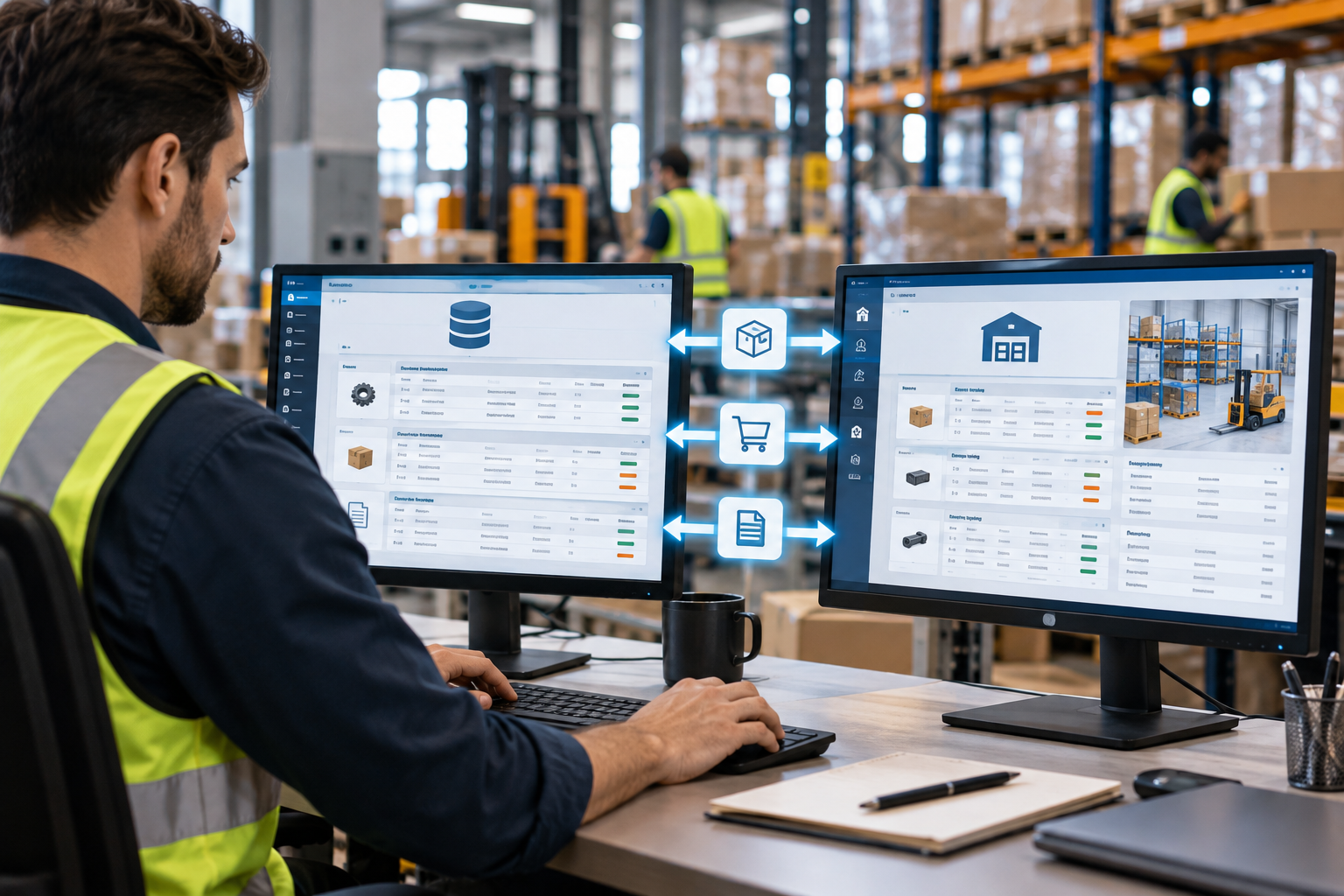
Item master, purchase orders and sales orders synchronised from the ERP into the WMS
What ERP-WMS Integration Covers
- Item master sync: every SKU, unit of measure, and lot configuration maintained in ERP and pushed to WMS, so there is one source of truth for product data.
- Purchase order sync: inbound POs flow from ERP to WMS before trucks arrive, and WMS receiving is linked to the ERP PO rather than being a free receipt.
- Sales order sync: outbound orders flow from ERP to WMS for pick planning, and WMS shipment confirmation writes back to the ERP sales order.
- Inventory sync: WMS scan events write to ERP inventory records in real time, covering receiving, picks, adjustments, and transfers.
- Lot and serial traceability: lot codes assigned in WMS are recorded in ERP lot history, so forward and backward trace is available from either system.
Where The Integration Goes Wrong
- Batch synchronization instead of real-time: the WMS uploads to the ERP hourly or overnight. ERP inventory lags behind physical reality, decisions get made from stale data, and any mismatch becomes a reconciliation problem.
- Dual inventory records: ERP and WMS each maintain their own stock count and sync by exception. When they fall out of sync there is no clear authority.
- Item master drift: WMS item records get updated locally without pushing changes back to ERP, producing different UOM configurations and different reorder logic across two systems.
- Missing financial posting: a WMS receipt is confirmed but the ERP PO is never updated. Accruals are wrong, and finance closes the month on incorrect inventory values.

Batch upload windows are where ERP inventory drifts away from physical reality
Batch synchronisation
ERP inventory lags by the length of the batch window, mismatches surface at reconciliation after the fact, and financial postings are queued where they can be missed entirely.
Real-time synchronisation
ERP inventory reflects the floor within seconds of each scan, mismatches surface as an exception at the moment they occur, and every scan event posts its accounting entry automatically.
For operations that need ERP-WMS integration but do not want to manage two separate systems, GrayCyan builds middleware that connects the ERP inventory management layer directly to scan hardware, so there is no standalone WMS to integrate.
Not Sure Whether Your ERP Has Hit Its Limit?
20 minutes. Tell us your daily pick volume, your inventory accuracy, and which ERP you run, and we will tell you whether configuration and scan integration closes the gap or whether you have genuinely outgrown the module.
What Is a Warehouse Execution System, and When Does It Matter?
WES is the least understood layer of warehouse technology for most mid-market manufacturers, and for most of them it is also the least relevant. Understanding where WES fits helps clarify where ERP ends and where WMS ends.
A warehouse execution system receives work instructions from the WMS and translates them into real-time equipment commands: which sorter lane, which conveyor speed, which robot task next. It balances workload across automation equipment in real time, functioning as something like a traffic controller for warehouse machines.
Not all warehouses have a WES, as it only exists when there is significant automation equipment to orchestrate. A warehouse running human pickers with barcode scanners does not need one, because the WMS manages the work directly.

WES only earns its place once automation density makes real-time orchestration necessary
What A WES Actually Orchestrates
Sorters
Assigns each carton a lane and re-balances lanes as order mix changes through the shift.
Conveyors
Controls speed, merge points and accumulation so upstream zones do not starve or flood downstream ones.
Goods-to-person robots
Sequences tote presentation at the pick station against the live pick queue.
AS/RS
Schedules storage and retrieval moves against current demand rather than a fixed queue.
Autonomous mobile robots
Allocates tasks and routes across the fleet, avoiding congestion at aisle intersections.
Workload balancing
Shifts work between automation and human zones in real time when one side falls behind.
Most mid-market manufacturers with 50 to 500 employees do not have the automation equipment density that requires a WES.
Cost Comparison: ERP Warehouse Module vs Standalone WMS vs Custom Build
Cost comparison for WMS vs. ERP warehouse modules is more nuanced than most articles present. The license or SaaS cost is usually the smallest part of the total.

Three-year total cost, not the license line, is what separates these three options
| Cost category | ERP warehouse module | Standalone WMS | Custom build |
|---|---|---|---|
| SaaS license | Included, or $5k-$20k/yr | $10k-$60k/yr | No recurring SaaS license |
| Implementation | $20k-$80k | $50k-$200k | $80k-$200k |
| ERP integration | Usually included | $30k-$150k | Built into middleware |
| Ongoing license | May continue annually | Annual SaaS renewal | None after build |
| 3-year total | $25k-$120k | $80k-$700k+ | $80k-$200k |
The main risk with an ERP warehouse module is that if it does not support your compliance or volume requirements, you have spent the implementation budget without solving the problem. The main risk with a standalone WMS is that enterprise platforms come with SaaS licensing and an ERP integration project that can rival the platform cost itself.
The Fourth Option: Custom WMS Built on Your Existing ERP
The WMS vs. ERP decision assumes a binary choice, and most articles stop there. However, there is another option that is more suitable for mid-market manufacturers: a custom WMS layer built directly on top of the ERP you already run.
Scan hardware writes straight into the ERP through middleware, so there is no second inventory database to reconcile and no standalone platform to integrate.

A custom execution layer keeps the ERP as the single system of record
Scan events write straight to the ERP
Barcode and RFID scan events write to ERP inventory records through middleware. No standalone WMS database is involved.
Execution built as a custom layer
Receiving workflows, putaway rules, pick path optimization, and shipping confirmation get built as a custom execution layer connected directly to the ERP.
Compliance generated during production
Lot traceability and FSMA 204 compliance documentation get generated from ERP data during production and shipping, not assembled after the fact.
One system of record, nothing to reconcile
The ERP stays the system of record while the custom layer handles execution. There is no separate system to integrate or reconcile.
Measured Impact
What the three approaches actually deliver on accuracy and volume
What the custom-build approach delivered for a Fishbowl ERP distributor
No standalone WMS. No new platform. Just custom WMS development built on the ERP the distributor already ran.
Frequently Asked Questions: WMS vs ERP vs WES
Work Out Which Layer You Actually Need
Tell us which ERP you run, your daily pick volume, your current inventory accuracy, and your compliance requirements. We will map whether the answer is ERP configuration, a standalone WMS, or a custom execution layer built on the ERP you already own.