
Custom WMS Development for Manufacturers: Warehouse Management System Built on Your Existing ERP
No ERP replacement. No per-user licensing. You own everything at completion.
GrayCyan builds custom warehouse management systems for mid-market manufacturers, connected to the ERP the operation already runs, using the inventory, lot, and production data already sitting in that ERP as the foundation.
Book a Discovery Call




















What Is Custom WMS Development, and Why Off-the-Shelf Falls Short for Manufacturers
Warehouse management system development is the design and build of custom software that controls inventory movement, storage, picking, packing, shipping, and receiving in a warehouse or distribution center. It connects directly to the operation's ERP, MES, and logistics systems instead of running as a standalone platform.
Off-the-shelf WMS platforms run into the same walls at mid-market manufacturers, again and again.
Most companies that build custom WMS software are offshore development shops working strictly to spec. GrayCyan takes a different path.
Your ERP Stays → The WMS Executes
We build custom warehouse management systems for mid-market manufacturers, connected to the ERP the operation already runs, using the inventory, lot, and production data already sitting in that ERP as the foundation rather than duplicating it in a second system.

ERP Integration Is Expensive and Slow
Most WMS platforms connect natively to SAP and Oracle.
Run Epicor, Fishbowl, Acumatica, or Odoo, and you are looking at a custom integration project before the WMS does anything, often at a cost that matches a custom build.

Generic WMS Is Built for Generic Warehouses
A food manufacturer working under FSMA 204 lot traceability has different requirements than a discrete manufacturer tracking serialized aerospace parts.
Off-the-shelf platforms need heavy customization for regulated or operation-specific workflows.

You Do Not Own the System
SaaS WMS platforms charge monthly per-user or per-warehouse fees.
Stop paying, and your warehouse history and configurations go with it.

It Becomes Another Data Silo
A standalone WMS that does not write back to your ERP creates a new reconciliation problem.
Warehouse data drifts out of sync with production orders, inventory records, and purchasing.
Custom WMS Features: What GrayCyan Builds
These are the core capabilities GrayCyan builds into custom WMS deployments for mid-market manufacturers. The feature set is configured to the specific operation, not pulled from a fixed product checklist.
Core WMS features
Real-Time Inventory Tracking
Every item, bin, pallet, and location tracked live by barcode or RFID scan, tied directly to ERP inventory records with no manual reconciliation.
Lot and Serial Traceability
Every movement of every lot or serial number recorded from receiving through shipping, with forward and backward trace ready for a recall or quality investigation.
Receiving and Putaway
Automated receiving workflows and putaway rules based on product type, temperature zone, hazmat classification, or whatever business logic the operation runs on.
Pick, Pack, Ship
Wave picking, zone picking, or single-order picking configured to the actual warehouse layout, plus packing verification and shipping label and carrier integration.
Cycle Counting and Inventory Audit
Scheduled or continuous cycle counts, discrepancy flagging, and automatic ERP inventory adjustment, without shutting the floor down for a full physical count.
Returns and Reverse Logistics
RMA receipt, inspection, disposition routing, and the ERP credit memo or restocking workflow that follows it.
Yard and Dock Management
Inbound appointment scheduling, dock door assignment, and driver check-in, tied into the receiving workflow rather than sitting apart from it.
AI-Powered WMS Features Trained on Your Operational Data

Demand-Driven Slotting Optimization
A model reads pick frequency, order patterns, and seasonal demand.
It recommends slot assignments that cut travel time and picking errors.

Predictive Receiving
Machine learning tied to purchase order history and supplier lead times flags likely arriving shipments before they hit the dock.
Putaway planning starts early instead of reacting at the door.

Anomaly Detection Across Warehouse Transactions
Ongoing monitoring of warehouse transaction data catches unusual patterns.
Unexplained shrinkage, pick error spikes, and dock dwell time outliers get caught before they turn into a real operational problem.
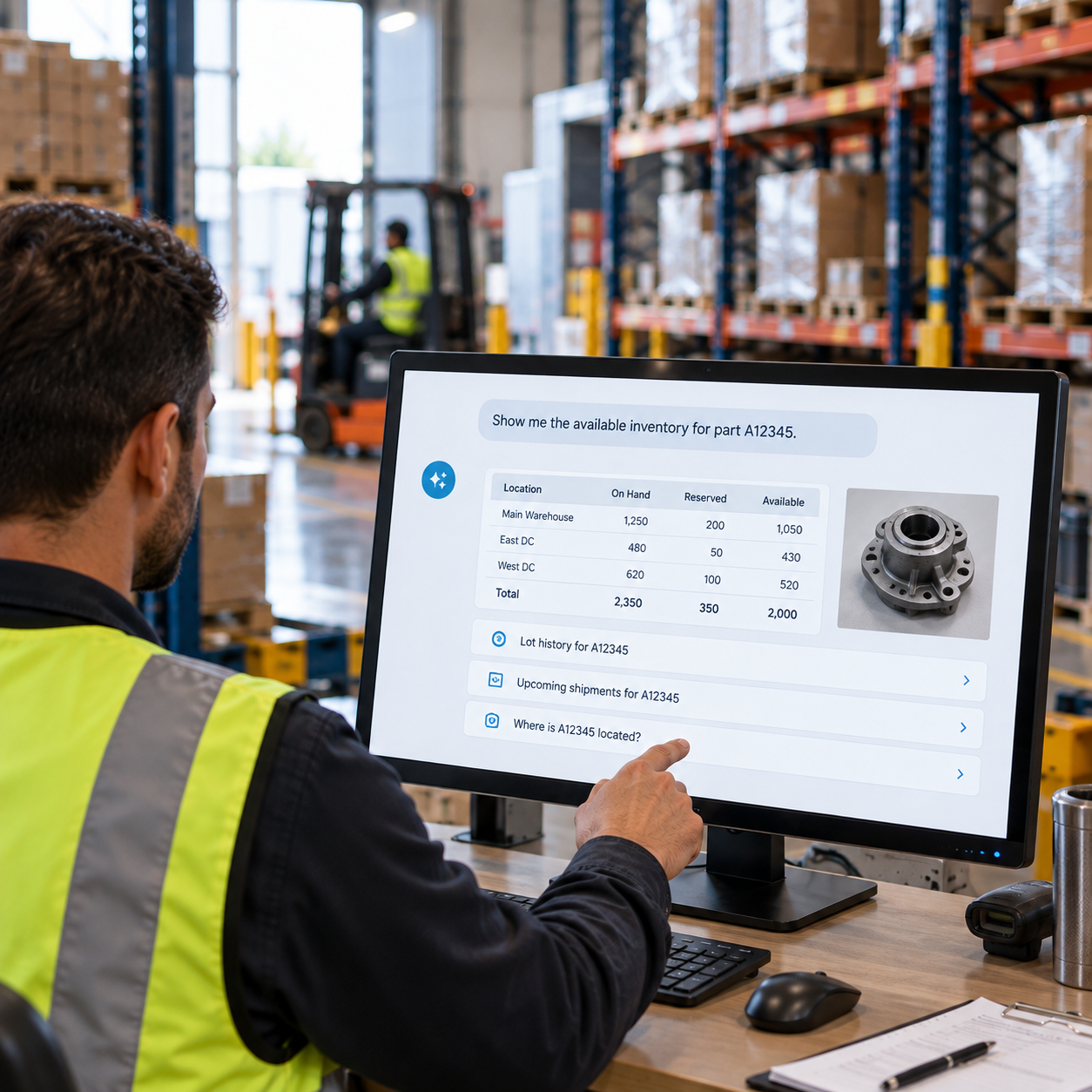
Natural Language Inventory Queries
Retrieval-based AI over warehouse and ERP records lets operators and managers ask about inventory, lot history, or shipment status in plain language.
No digging through WMS screens to find it.
Key Benefits of a Bespoke WMS Versus Off-the-Shelf
Built for Your Operation
Every workflow, rule, and integration configured for how your warehouse actually runs.
Not how a platform vendor assumed it would.
Connected to Your ERP
Inventory, lot data, production orders, and purchase orders flow between WMS and ERP automatically.
No dual entry and no reconciliation.
Full Ownership
No per-user licensing, no vendor lock-in.
No dependence on a platform that can be discontinued or repriced without warning.
Grows With the Operation
New workflows, new facilities, or new ERP integrations get added on your schedule.
No waiting on a platform upgrade cycle or a licensing negotiation.
Compliance Built In
FSMA 204 key data element capture, USDA batch records, ITAR access controls, and cold chain documentation.
Configured at build time, not bolted on after the fact.
WMS ERP Integration: Why the Connection to Your ERP Is Everything
Most WMS implementations do not fail because of the WMS itself. They fail because of the ERP integration. A warehouse management system running disconnected from the ERP creates a new data entry burden, a reconciliation problem, and a single point of failure every time the two systems drift out of sync.
ERP-WMS integration is not a nice-to-have feature. It is the reason a custom WMS makes sense for a manufacturer in the first place. An off-the-shelf WMS with a generic connector to your ERP is not real integration. It is a scheduled file transfer wearing a WMS interface. For manufacturers weighing that broader ERP question, GrayCyan's ERP AI automation work covers the same connection from the ERP side.
How GrayCyan approaches WMS ERP integration:
- A middleware layer connects WMS to ERP through API, reading inventory, purchase orders, production orders, and lot data from the ERP and writing warehouse transactions back as structured records.
- The ERP stays the system of record. All financial transactions, lot history, inventory valuation, and order management stay in the ERP. The WMS runs as the execution layer, controlling physical movement without building a second, parallel inventory universe.
- Sync runs both ways. Receiving confirmations write to ERP purchase orders. Pick completions write to ERP sales orders. Cycle count adjustments write to ERP inventory, automatically, without a person bridging the gap.
- No ERP replacement required, at any point in the process.
WMS Implementation: How GrayCyan Builds and Deploys Custom Warehouse Management Systems
Custom WMS development does not end at go-live. For a manufacturer, the implementation phase is where most of the value gets created or lost, and the difference almost always comes down to how well the system was scoped against actual warehouse operations before a single line of code was written.
A focused custom WMS deployment for a single warehouse connected to one ERP typically takes 10 to 14 weeks from operations audit to go-live. Multi-facility or multi-ERP deployments are phased, with the first facility going live before the rest of the rollout follows.
Operations Audit (week 1 to 2)
GrayCyan maps the physical warehouse. This includes floor layout, storage types, receiving and shipping volumes, pick methodology, lot and serial requirements and carrier integrations.
The audit also checks ERP data quality like inventory accuracy, lot tracking completeness and purchase order structure.
Requirements and Integration Design (week 2 to 4)
Warehouse workflows get documented, ERP integration points get specified and compliance requirements (FSMA 204, USDA, ITAR cold chain) are mapped to data capture needs.
No build begins until this document is signed off.
Core WMS Build (week 4 to 10)
Receiving, putaway, pick, pack, ship, cycle count and returns workflows get built.
ERP integration middleware is developed and tested against live data. Barcode and RFID scan logic is configured.
AI Layer (parallel or phase two)
Machine learning models for slotting optimization, predictive receiving, anomaly detection and inventory queries are trained on operational data.
It is deployed as a layer above the core WMS, so retraining never touches core warehouse operations.
Parallel Run and Go-Live (week 10 to 14)
The WMS runs parallel to existing processes for one to two weeks. Discrepancies get identified and resolved before full cutover.
Staff training wraps up. ERP sync gets verified end to end.
Ownership Transfer
All source code, database schemas, API documentation, and training materials are transferred to the manufacturer.
No ongoing license fees. GrayCyan stays available for support, enhancements or added modules on a project basis.
Custom WMS Development vs Off-the-Shelf: When to Build
Every custom WMS development conversation starts with the same question: why not just buy an off-the-shelf platform? For some operations, you should. For others, the integration cost, the customization requirement, and the licensing structure of off-the-shelf platforms make a custom build the better decision, both economically and operationally.
Your ERP is not natively supported. Most WMS platforms have connectors for SAP and Oracle. Run Epicor, Fishbowl, Acumatica, or Odoo and integration work alone can cost as much as a custom build.
Your workflows are regulated or operation specific. FSMA 204 lot traceability, USDA compliance documentation, ITAR access controls, cold chain monitoring, or proprietary lot genealogy requirements tend to be things off-the-shelf platforms handle poorly or only with expensive customization.
You want to own the system. No ongoing license fees, no vendor lock in, no dependence on a platform that can be discontinued, acquired or repriced.
You need AI built in from day one. Off-the-shelf WMS platforms have started adding AI features, but they are not trained on your operational data. A custom WMS can run models trained on your actual pick patterns, your actual lot history, your actual supplier lead times, from the start.
Your operation spans non-standard channels. Co-packing, 3PL work, direct to consumer fulfillment running alongside B2B wholesale or multi-temperature storage. These combinations usually need configurations off-the-shelf systems cannot handle without significant custom work.
You run SAP or Oracle and need standard warehouse operations. Manhattan Associates, Korber and SAP Extended Warehouse Management are well integrated options with established support behind them.
You need to go live in 60 days. SaaS WMS platforms deploy faster than custom builds when the ERP integration is straightforward and the workflows are standard.
You have a dedicated IT team to manage ongoing customization and licensing. Off-the-shelf platforms work best when someone in-house owns the vendor relationship long term.
If you are not sure which side of that line your operation falls on, GrayCyan's AI Readiness Assessment maps your current ERP, warehouse data quality and compliance requirements. It produces a recommendation before any development scope gets agreed upon.
Custom WMS in Practice: GrayCyan Deployments
Across Fishbowl distribution, USDA-regulated food processing, and ITAR-controlled defense-adjacent operations. No ERP replaced in any of them.
Fishbowl ERP Distribution Manufacturer
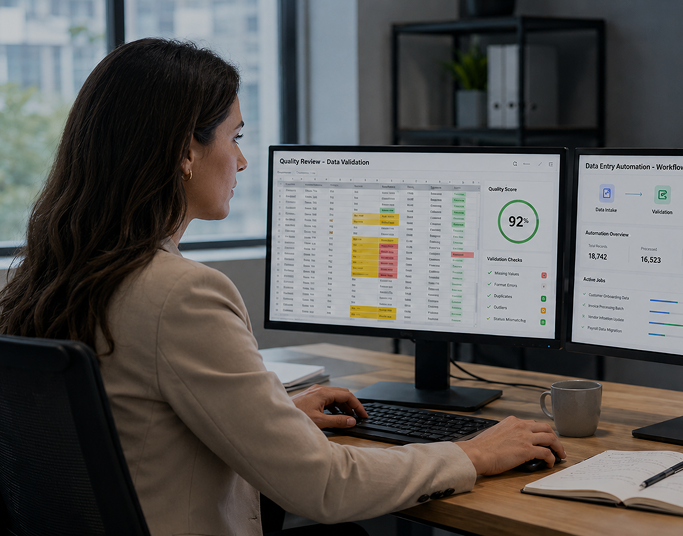
A mid-market distributor running Fishbowl ERP had warehouse operations completely disconnected from it, roughly 12 hours a day of manual data entry bridging receiving, picking, and inventory reconciliation.
GrayCyan built an API middleware layer connecting Fishbowl to the warehouse transaction workflows, so inbound receipts updated ERP purchase orders automatically, pick completions updated sales orders automatically and inventory adjustments wrote to the ERP without manual entry. The result: an 85 percent cut in daily manual data entry, from 12 hours down to under 2. Full lot genealogy became traceable in minutes, with no ERP replacement and full ownership by the client.

USDA-Regulated Food Manufacturer
A USDA-regulated meat processor needed FSMA 204-compliant lot traceability built into warehouse receiving and shipping workflows from the outset, not retrofitted after go-live.
GrayCyan built a custom WMS with key data element capture at every critical tracking event (receiving, transforming, shipping), generating batch records and lethality evidence automatically during each production and shipping run. The result: FSMA 204 compliant traceability from day one, with audit response time cut from 2 to 3 days down to under 60 seconds, and no new platform layered on top of the existing ERP.

Air-Gapped, Defense-Adjacent Manufacturer
An ITAR-controlled manufacturer could not run a cloud-based WMS. Full warehouse management and engineering document retrieval needed to run entirely on premises.
GrayCyan built an on-premises WMS connected to the existing ERP, with retrieval based AI over engineering drawings and project history, allowing natural language queries across 40 years of technical documentation without leaving the facility. The result: warehouse operations and engineering lookup fully digital, fully on-premises, with zero data leaving the facility boundary.
More detail on the AI layer behind these builds is in GrayCyan's manufacturing AI solutions and ERP AI automation work.
Not sure whether to build or buy?
Tell us which ERP you run and how the warehouse operates today. We will map the integration cost either way before any development scope gets agreed upon.
Who Custom WMS Development Is Right For
Mid-Market Manufacturers and Distributors
50 to 500 employees running an ERP that needs to connect to warehouse operations rather than be replaced by one.
Regulated Compliance Requirements
FSMA 204, USDA, FDA, ITAR requirements that need documentation built into warehouse workflows from the start.
Operation-Specific Workflows
Co-packers, 3PLs, and manufacturers whose workflows off-the-shelf WMS platforms cannot configure without heavy customization.
Operations That Want to Own It
Teams that want to own their warehouse management system outright, without ongoing licensing fees.
AI Trained on Your Own Data
Manufacturers who want AI-powered warehouse features trained on their own operational data rather than a generic model.
Not the right fit:
- Operations running SAP or Oracle with standard warehouse workflows, where an established WMS platform is likely the better choice
- Operations that need a WMS live in under 8 weeks, since custom builds take longer than a SaaS deployment
- Warehouses with no existing ERP or inventory data foundation, where a data readiness project needs to come before custom WMS development
Frequently Asked Questions: Custom WMS Development
Ready to Build a Custom WMS on Your Existing ERP?
Tell us which ERP you run, how your warehouse operates today, and what your biggest gap actually is: inventory accuracy, lot traceability, compliance documentation, or simply too much manual data entry bridging WMS and ERP. GrayCyan will show you what a custom warehouse management system built on your existing infrastructure looks like.
GrayCyan has built custom WMS and warehouse integration systems for USDA-regulated food manufacturers, Fishbowl ERP distributors, and ITAR-controlled defense-adjacent operations. Every system is owned fully by the client at completion.
Start with our AI Readiness Assessment → or see how we connect WMS to existing ERP →