
AI Workflow Automation Software
Everything operations leaders, CTOs, and founders need to evaluate, compare, and implement the right AI automation platform.
Partners, Mentions and Clients

Partners, Mentions and Clients
AI Workflow Automation Software: The Complete Buyer’s Guide
AI workflow automation software uses machine learning to automate multi-step business processes that require judgment, not just rules. Unlike traditional automation tools, these platforms learn from patterns, handle exceptions autonomously, and improve over time. They’re built for operations, IT, and business teams looking to eliminate manual work across departments without writing code or maintaining brittle rule sets.
If you’re reading this, you’ve probably already outgrown basic automation. Maybe you started with Zapier or Make to connect a few apps, but now you need something that can handle conditional logic, route decisions intelligently, and scale across your organization. This guide is built for that exact moment in your evaluation: you know the category exists, and you need to pick the right platform.
We’ll walk through what separates AI-powered workflow automation from the tools you’ve already tried, the features that actually matter, how to evaluate vendors without getting lost in feature matrices, and what realistic implementation looks like. No fluff, no rankings paid for by vendors—just the framework you need to make a confident decision.
What Is AI Workflow Automation Software?
AI workflow automation software is a category of platforms that use artificial intelligence—primarily machine learning and natural language processing—to design, execute, and optimize business workflows. Where traditional automation requires you to define every rule and exception upfront, AI-powered platforms can interpret context, learn from historical data, and make decisions within workflows without human intervention.
A practical example: in a traditional automation setup, you might build a rule that routes all invoices over $10,000 to a senior approver. An AI workflow automation platform goes further. It learns that invoices from certain vendors are always approved regardless of amount, that specific team members tend to delay approvals on Fridays, and that a particular invoice format signals a recurring subscription that can be auto-approved. The system adapts.
The core components of most AI workflow automation platforms include a visual workflow builder for designing processes, an AI engine for decision-making and optimization, a connector ecosystem for integrating with your existing tools, monitoring and analytics dashboards, and governance controls for compliance and audit trails.
This category sits at the intersection of several established technologies—robotic process automation (RPA), integration platforms (iPaaS), and business process management (BPM)—but it’s distinct because the AI layer makes processes adaptive rather than static.
Table of Contents
AI Workflow Automation Software. Get Your AI Readiness Assessment →
How AI Workflow Automation Differs from Traditional Automation
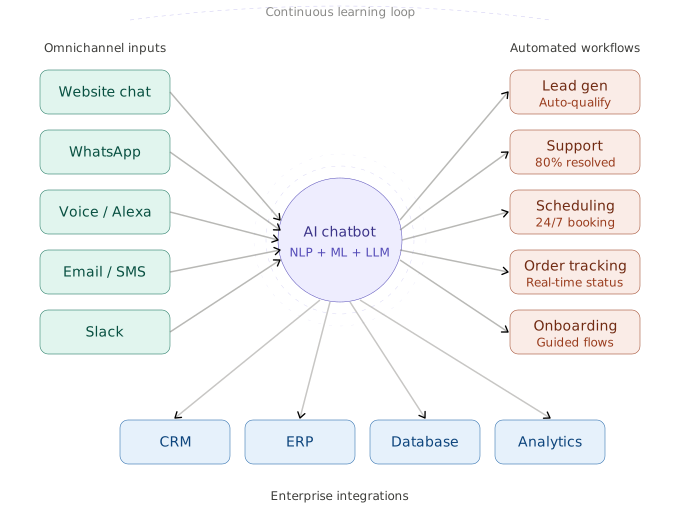
The distinction between traditional automation and AI-powered workflow automation isn’t just marketing. It’s architectural, and it determines what kinds of problems each approach can solve.
Robotic process automation, or RPA, is essentially scripted macro execution. It follows pre-defined rules to perform structured, repetitive tasks: copy data from this field, paste it into that system, click this button. RPA is powerful for high-volume, zero-variance tasks, but it breaks the moment something unexpected happens—a field moves, a format changes, or an exception arises that wasn’t anticipated in the rule set.
Integration platforms like Zapier and Make connect applications through trigger-action sequences. They’re excellent for simple, linear workflows: when a form is submitted, create a row in a spreadsheet and send a Slack notification. But they don’t handle branching logic well, they can’t learn from outcomes, and they have no mechanism for optimization.
AI workflow automation combines connectivity with intelligence. These platforms can process unstructured data (emails, documents, images), make probabilistic decisions (should this ticket be escalated or auto-resolved?), optimize routing in real time (which team member will resolve this fastest based on historical performance?), and improve continuously through feedback loops.
Think of it this way: RPA is a reliable assembly line worker. iPaaS is a postal service connecting Point A to Point B. AI workflow automation is an operations manager who understands context, adapts to changes, and gets smarter every quarter.
AI Workflow Automation Software. Get Your AI Readiness Assessment →
Key Features to Look for in AI Workflow Automation Tools
Not all platforms marketed as “AI automation” deliver the same capabilities. When evaluating tools, prioritize these features based on their impact on real-world automation outcomes.
- Natural Language Processing Capabilities
The platform should be able to interpret unstructured text—emails, support tickets, documents—and extract intent, entities, and sentiment. This is what allows automation to extend beyond structured database fields into the messy reality of how businesses actually communicate.
- Predictive Decision Routing
Look for platforms that can route tasks, approvals, and escalations based on predicted outcomes, not just static rules. The system should learn which paths lead to faster resolution, fewer errors, and better outcomes, then apply those insights automatically.
- Integration Ecosystem
The platform’s value is directly proportional to what it can connect to. Evaluate both the breadth of pre-built connectors (Salesforce, Slack, Jira, SAP, etc.) and the quality of the API for building custom integrations. Pay attention to whether integrations support bi-directional data sync or just one-way triggers.
- Visual Workflow Builder
A low-code or no-code interface for designing workflows is essential for adoption. The builder should support conditional branching, parallel execution, error handling, and human-in-the-loop checkpoints without requiring engineering involvement.
- Process Mining and Discovery
Advanced platforms include process mining capabilities that analyze your existing operations to identify automation candidates. This transforms the platform from a tool you configure to a system that proactively suggests what to automate.
- Monitoring, Analytics, and Audit Trails
Every automated workflow should produce a complete execution log. Look for real-time dashboards, alerting for failures or anomalies, and exportable audit trails for compliance. This is non-negotiable for regulated industries.
- Error Handling and Human-in-the-Loop Fallbacks
AI isn’t infallible. The platform must handle edge cases gracefully—routing uncertain decisions to a human reviewer, retrying failed steps, and learning from corrections to reduce future errors.
- Security and Compliance Infrastructure
Enterprise-grade encryption (at rest and in transit), role-based access controls, SSO/SAML integration, SOC 2 Type II certification, and GDPR compliance are baseline requirements. Data residency options matter for organizations operating across jurisdictions.
Top Use Cases Across Industries
AI workflow automation isn’t confined to a single department. The platforms that deliver the strongest ROI tend to be deployed across multiple functions. Here are the use cases driving the most adoption.
Finance and Accounting
Invoice processing is the gateway use case: AI reads invoices in any format, extracts line items, matches them to purchase orders, flags discrepancies, and routes approvals. Beyond AP, teams automate expense report reviews, revenue recognition workflows, and month-end close procedures. Organizations typically report 70–80% reductions in manual processing time.
HR and People Operations
Employee onboarding is a natural fit—triggering provisioning across IT systems, sending welcome sequences, scheduling orientation sessions, and tracking completion. AI adds value by personalizing onboarding paths based on role and department and by automating routine employee service requests (PTO questions, benefits inquiries, policy lookups).
Marketing and Sales Operations
Lead scoring and routing benefit enormously from AI automation. Instead of static scoring rules, the system learns which lead attributes and behaviors actually predict conversion, then routes qualified leads to the right rep at the right time. Campaign operations—asset approvals, UTM management, reporting rollups—also see significant efficiency gains.
IT and DevOps
Incident management, access provisioning, and change request workflows are high-volume, high-stakes processes where AI automation reduces both response times and human error. AI-powered triage can categorize and prioritize tickets before a human ever sees them, ensuring critical issues get immediate attention.
AI Workflow Automation Software. Get Your AI Readiness Assessment →
How to Evaluate AI Workflow Automation Platforms
With dozens of vendors in the market—each claiming to be AI-powered—you need a structured evaluation framework. Here’s the methodology we recommend for any organization making this decision.
Step 1: Map Your Automation Candidates
Before looking at any vendor, document the 5–10 workflows you want to automate first. For each, note the current process, the systems involved, the data types (structured vs. unstructured), the volume, and the business impact of automation. This becomes your evaluation scorecard.
Step 2: Assess AI Capabilities (Not Just Marketing)
Ask vendors specific questions: What ML models power decision-making? Can the system be trained on our data? How does it handle edge cases it hasn’t seen before? Request a proof of concept using one of your actual workflows, not a canned demo. The gap between demo and reality is where most disappointments originate.
Step 3: Evaluate Integration Depth
Check whether the platform’s connectors support the specific API endpoints you need, not just the application logos on their integrations page. A Salesforce connector that only reads Contacts is very different from one that supports custom objects, flows, and platform events.
Security and Compliance Checklist
Require documentation for SOC 2 Type II certification, GDPR compliance mechanisms, encryption standards, data residency options, and role-based access controls. Ask specifically about how data flows between the platform and your systems: is data stored or just passed through? Where are models trained, and on whose data?
Scalability Questions to Ask Vendors
- What is the maximum number of workflow executions per month, and what happens when we exceed it?
- How does pricing change as we scale from one department to the entire organization?
- Can the platform handle concurrent execution of hundreds or thousands of workflow instances?
- What is the SLA for workflow execution latency?
How are platform updates deployed, and do they require downtime or workflow reconfiguration?
AI Workflow Automation Software Comparison
The following comparison covers the major platforms in the AI workflow automation space. Feature availability, pricing, and capabilities are based on publicly available information and may change. Always verify directly with vendors during your evaluation.
Platform | AI Capabilities | Best For | Integration Count | Starting Price |
Microsoft Power Automate | Copilot AI, AI Builder for forms and docs | Microsoft-stack enterprises | 1,000+ | ~$15/user/mo |
Workato | ML-powered recipe suggestions, smart data mapping | Mid-market to enterprise, complex integrations | 1,200+ | Custom pricing |
Zapier | AI actions, NLP-based workflows (newer) | SMBs, simple multi-app automations | 7,000+ | ~$20/mo (Starter) |
Make (Integromat) | AI modules, visual scenario builder | Technical users, complex branching | 1,500+ | ~$9/mo (Core) |
UiPath | AI Center, document understanding, computer vision | Enterprise RPA with AI augmentation | 500+ | Custom pricing |
n8n | AI agent nodes, self-hostable | Developers, privacy-sensitive orgs | 400+ | Free (self-hosted) |
Automation Anywhere | IQ Bot, generative AI | Large enterprise, legacy system automation | 300+ | Custom pricing |
A few important notes on this comparison. Integration count is a misleading metric in isolation—what matters is whether the specific integrations you need are supported and how deeply they’re built. Starting prices often exclude the AI features that differentiate these platforms; budget for the tier that includes ML capabilities. Finally, the “best for” column reflects the platform’s strongest positioning, not a hard limitation.
AI Workflow Automation Software. Get Your AI Readiness Assessment →
Implementation: Getting Started in 30 Days
One of the most common reasons automation projects stall isn’t technology—it’s scope creep and unclear timelines. Here’s a realistic 30-day implementation plan for getting your first AI-powered workflow live.
Week 1: Discovery and Platform Setup (Days 1–7)
- Select your first automation candidate (choose high-volume, low-complexity to build momentum)
- Document the current process step-by-step, including exceptions and edge cases
- Provision the platform: SSO integration, role assignments, and sandbox environment setup
- Connect the 2–3 core integrations your first workflow requires
Week 2: Build and Configure (Days 8–14)
- Design the workflow in the platform’s builder, mapping each step from your documentation
- Configure AI decision points: what data does the model need, and what outcomes is it optimizing for?
- Set up error handling: define fallback actions, human-in-the-loop escalation triggers, and retry logic
- Build a parallel test workflow with sample data
Week 3: Test and Iterate (Days 15–21)
- Run the workflow against historical data to validate accuracy and performance
- Identify and fix edge cases—the first test run will always surface unexpected scenarios
- Conduct user acceptance testing with the team that currently owns the process
- Refine AI model parameters based on test results
Week 4: Launch and Monitor (Days 22–30)
- Deploy the workflow to production with monitoring alerts enabled
- Run in shadow mode for the first 3–5 days (AI makes decisions, but humans still review and confirm)
- Transition to full automation once accuracy meets your threshold (typically 95%+)
- Document the workflow, assign an owner, and schedule the first optimization review for Day 60
This timeline assumes a single-department, single-workflow deployment. Enterprise-wide rollouts involving multiple departments, complex integrations, and change management programs typically take 2–6 months. The key is starting small, proving value, and expanding from a position of demonstrated ROI.
ROI and Business Impact
AI workflow automation is an investment, and it needs to be justified with more than efficiency promises. Here’s how to think about and measure the return.
Time-to-Value Benchmarks
Based on published case studies and industry data, organizations typically see the following results within the first 6 months of deployment.
Metric | Typical Improvement | Timeframe |
Manual processing time | 60–80% reduction | First workflow, Month 1 |
Error rate in automated processes | 40–60% reduction | After AI model training, Month 2–3 |
Employee time reclaimed per week | 8–15 hours per team | Across first 3 workflows |
Average approval cycle time | 50–70% faster | Immediate on deployment |
Cost per transaction/process | 30–50% lower | Month 3–6 (after optimization) |
Cost Savings Calculator Framework
To build your own business case, calculate the following for each workflow you plan to automate:
- Current cost: (Hours spent per week) × (Average hourly loaded cost of employees involved) × 52 weeks = Annual cost of the manual process.
- Automation cost: Platform subscription + implementation cost (internal hours or consultant fees) + ongoing maintenance (typically 10–15% of implementation cost annually).
- Net savings: Annual manual cost minus annual automation cost. Most organizations see breakeven within 3–6 months for their first workflow and positive ROI within the first year across 3–5 automated processes.
The less obvious ROI comes from error reduction (fewer rework cycles, fewer customer-facing mistakes), speed (faster response times improve customer satisfaction and competitive positioning), and scalability (automated processes scale linearly while manual ones require proportional headcount increases).
AI Workflow Automation Software. Get Your AI Readiness Assessment →
Common Pitfalls and How to Avoid Them
Transparency builds trust, and we’d rather you succeed than buy. Here are the mistakes we see most often.
Automating broken processes. If your current workflow is convoluted, automating it just creates a faster mess. Map and improve the process first, then automate the optimized version. This is the number one cause of automation project failure.
Over-scoping the first project. Starting with your most complex, cross-departmental workflow is tempting because it has the biggest ROI potential. It’s also the highest-risk path. Begin with a contained, high-volume process in a single department. Use the win to build organizational buy-in for larger initiatives.
Ignoring change management. The people currently performing the work you’re automating need to be involved from Day 1. They understand the edge cases better than anyone, and their buy-in determines whether the automation actually gets adopted or quietly circumvented.
Treating AI as a black box. If you can’t explain why the AI made a specific decision, you’re not ready for production. Insist on model explainability, audit trails, and clear escalation paths for decisions the AI isn’t confident about.
Skipping monitoring after launch. Automation is not set-and-forget. Workflows need ongoing monitoring, periodic retraining of AI models, and regular optimization reviews. Budget for this operationally from the start.
Can AI automation replace human workers? It’s the question everyone asks and vendors sidestep. The direct answer: AI automation augments human workers rather than replacing them. It handles repetitive, rule-heavy tasks so teams can focus on strategic and creative work. Organizations that frame automation as augmentation see higher adoption rates and better ROI than those positioning it as headcount reduction.
Frequently Asked Questions (FAQ)
What is the difference between RPA and AI automation?
An AI-powered chatbot for manufacturing technicians that diagnoses industrial equipment faults before a specialist is dispatched. It uses Retrieval-Augmented Generation (RAG) to search 600+ OEM technical manuals, 12,000+ service bulletins, and OSHA/NFPA safety standards, then returns exactly three ranked diagnostic hypotheses with verified source citations. It runs on AWS SageMaker (Llama 3.1 8B), Qdrant Cloud, PostgreSQL, and a Next.js frontend.
How much does workflow automation software cost?
Workflow automation software typically costs $15–$50 per user per month for mid-market tools, with enterprise platforms ranging from $500–$5,000+ per month depending on volume and features. Most vendors offer usage-based or tiered pricing. Always factor in implementation and integration costs beyond the license fee.
How long does it take to implement workflow automation?
Basic AI workflow automation can go live in 2–4 weeks for a single department. Enterprise-wide rollouts typically take 2–6 months including integration, testing, and change management. Choosing a platform with pre-built connectors and templates accelerates time-to-value significantly.
Is AI workflow automation secure?
Leading AI workflow automation platforms maintain SOC 2 Type II certification, GDPR compliance, and enterprise-grade encryption. Look for role-based access controls, audit logging, and data residency options. Security should be evaluated at both the platform and integration layer.
What is hyperautomation?
Hyperautomation is a term coined by Gartner describing the combination of multiple automation technologies—AI, ML, RPA, process mining, and low-code tools—to automate as many business processes as possible. AI workflow automation platforms are a core component of a hyperautomation strategy.
Can small businesses use AI workflow automation?
Yes. Several platforms offer SMB-friendly pricing and no-code interfaces that don’t require a dedicated IT team. The key is starting with a single high-impact workflow rather than trying to automate everything at once. Many small businesses begin with customer onboarding, invoicing, or lead management automation.
Do I need a developer to set up AI workflow automation?
Most modern platforms are designed for business users with no-code or low-code interfaces. You can build, test, and deploy workflows without writing code. However, more complex integrations, custom AI model training, and enterprise deployments may benefit from developer or consultant involvement during initial setup.